Solution
AI voice agents for FreePBX
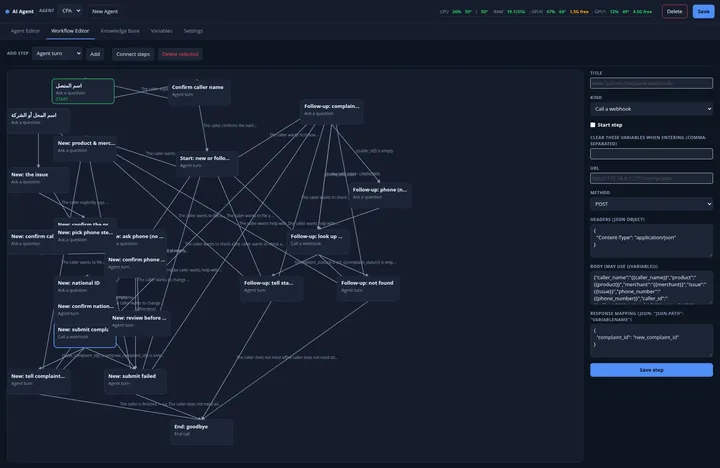
AI Agent is a FreePBX 17 module that answers calls with a conversational voice agent. Each agent has its own system prompt, voice, language and model, follows a call flow you draw as a graph, and can transfer the caller, take a message, collect details and call your systems over a webhook.
The module handles the telephony and the call flow. The language model and the speech services are ones you choose: a local Ollama server, OpenAI or Anthropic for the model; Vosk, Whisper or OpenAI Whisper to listen; Piper, OpenAI or ElevenLabs to speak. With local models, call audio and transcripts never leave your network.
Who it is for
- Businesses on FreePBX 17 that want calls answered or routed by an AI agent
- Integrators building voice agents for their clients' PBXs
- Teams that need call audio and transcripts to stay on their own servers
Products
 Licence
AI Agent for FreePBXConversational voice agents for your PBX
$799 One-time fee per FreePBX server
 Licence
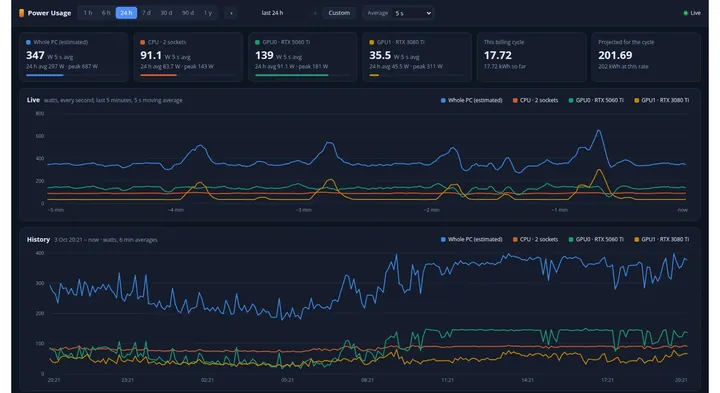
Power UsageElectricity use and cost for your AI Agent server
$49 One-time fee per FreePBX server
 Licence
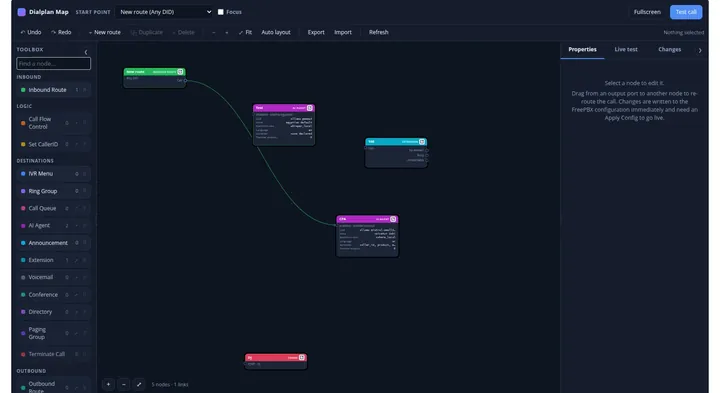
Dialplan MapSee your FreePBX call flow, edit it, and test-call it live
$149 One-time fee per FreePBX server
Main features
A FreePBX destination
Every enabled agent appears as a FreePBX destination, so inbound routes, IVRs, ring groups and time conditions can send calls to it.
Visual call flows
A node-graph workflow editor with agent turns, questions, transfers, messages, webhooks and hang-up, connected by conditions.
Variables and webhooks
Declare what the agent should collect – text, number, date, email, phone, national ID, full name or yes/no – and send it to your own systems, reading values back to the caller.
Knowledge base
Answers grounded in documents you add as text, .txt, .md, .docx or .pdf files.
Every call on record
Transcript, workflow path, actions and captured variables per call, and a live view of calls in progress, from the included AI Agent Calls module.
Test without a phone
A test call through your computer's microphone and speakers, plus separate tests for the model, the voice and speech-to-text.
Use cases
- Take a message or collect a caller's details, then transfer the call to the right FreePBX destination.
- Look up an order or ticket number in your own system over a webhook and read it back to the caller.
- Answer callers' questions from your own documents with the knowledge base.
- Send calls to an agent from an inbound route, an IVR option, a ring group or a time condition.
Prices and requirements
| Product | Price (USD) | Requirements |
|---|---|---|
| AI Agent for FreePBX | $799 – One-time fee per FreePBX server | FreePBX 17 / Asterisk 21; an LLM (Ollama server, or an OpenAI or Anthropic key); speech-to-text and text-to-speech services or cloud keys – not included |
| Power Usage | $49 – One-time fee per FreePBX server | AI Agent module 1.53.0 or later with its control daemon running on the services host; NVIDIA GPUs with nvidia-smi for GPU readings |
| Dialplan Map | $149 – One-time fee per FreePBX server | FreePBX 17, Asterisk 13+; the stock Asterisk Manager account; sox optional for non-WAV audio uploads |
Frequently asked questions
Does the price include the AI models or API usage?
No. The download contains the AI Agent and AI Agent Calls modules, command-line tools and helper scripts. Ollama, language and speech models, GPU drivers and cloud API accounts are not included, and any cloud AI provider you choose bills you directly for its usage.
Can it run fully on my own servers?
Yes, with a local Ollama model and local speech services such as Whisper or Vosk and Piper. Call audio and transcripts then never leave your network. A local model needs a suitable GPU for conversational response times.
Can callers interrupt the agent?
Yes, callers can barge in. An optional real-time mode over Asterisk ARI also captures what the caller said while interrupting; a setup script for ARI is included.
Which FreePBX version is required?
FreePBX 17 (Asterisk 21), with root access to install a module.
Can I watch calls while they happen?
Yes. AI Agent Live follows a call in progress – transcript, captured variables and turn audio as they arrive – and can hang up one call or all of them.