Software licence · VoIP & Telephony
AI Agent for FreePBX
Conversational voice agents for your PBX
Self-hosted AI voice agent for FreePBX 17: visual call flows, webhooks, knowledge base and call transcripts. Bring your own LLM and speech services.
AI Agent is a FreePBX 17 module that answers calls with a conversational voice agent. Each agent has its own system prompt, voice, language and model, follows a call flow you draw as a graph, and can transfer the caller, take a message, collect details and call your systems over a webhook. It ships together with its companion module, AI Agent Calls, which records every conversation the agent handles and lets you follow calls live.
The module is the telephony and orchestration layer. Understanding speech, deciding what to say and speaking it are done by services you choose: a language model (a local Ollama server, OpenAI or Anthropic), speech-to-text (Vosk, Whisper or OpenAI Whisper) and text-to-speech (Piper, OpenAI or ElevenLabs). These services are not part of the download – see Requirements below.
- A destination like any otherEvery enabled agent appears as a FreePBX destination, so inbound routes, IVRs, ring groups and time conditions can send calls to it.
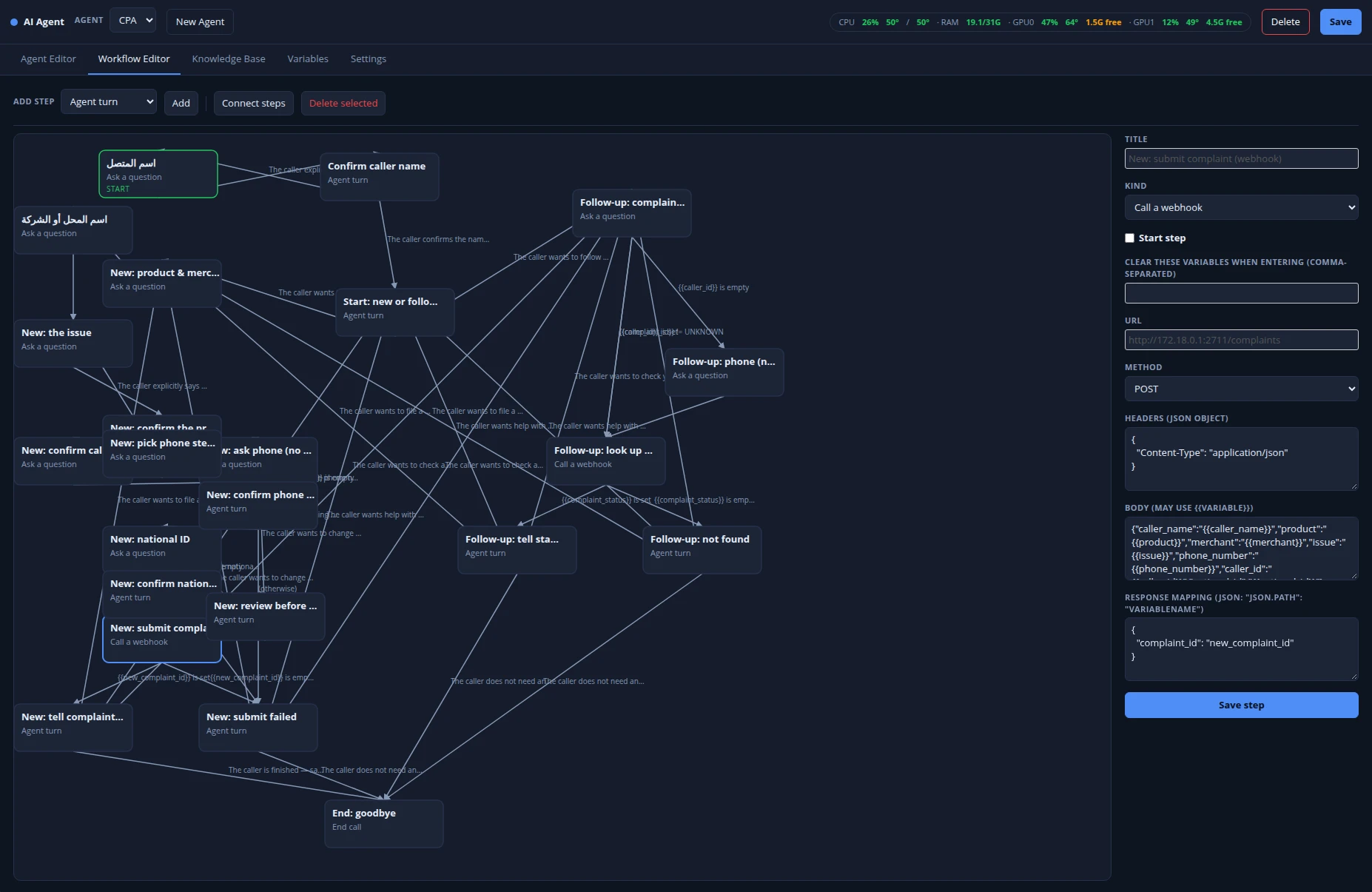
- Visual call flowsA node-graph Workflow Editor with branching conditions: agent turns, questions, transfers, messages, webhooks and hang-up.
- Bring your own AILocal Ollama, OpenAI or Anthropic for the model; local or cloud speech services for listening and speaking.
- Every call on recordTurn-by-turn transcript, workflow path, actions and captured variables for each call, plus a live view of calls in progress.
- Runs on your serversWith local models, call audio and transcripts never leave your network. No subscription and no per-minute charge from us.
Building an agent
Five tabs on one FreePBX page: Agent Editor, Workflow Editor, Knowledge Base, Variables and Settings.
- Agent Editor
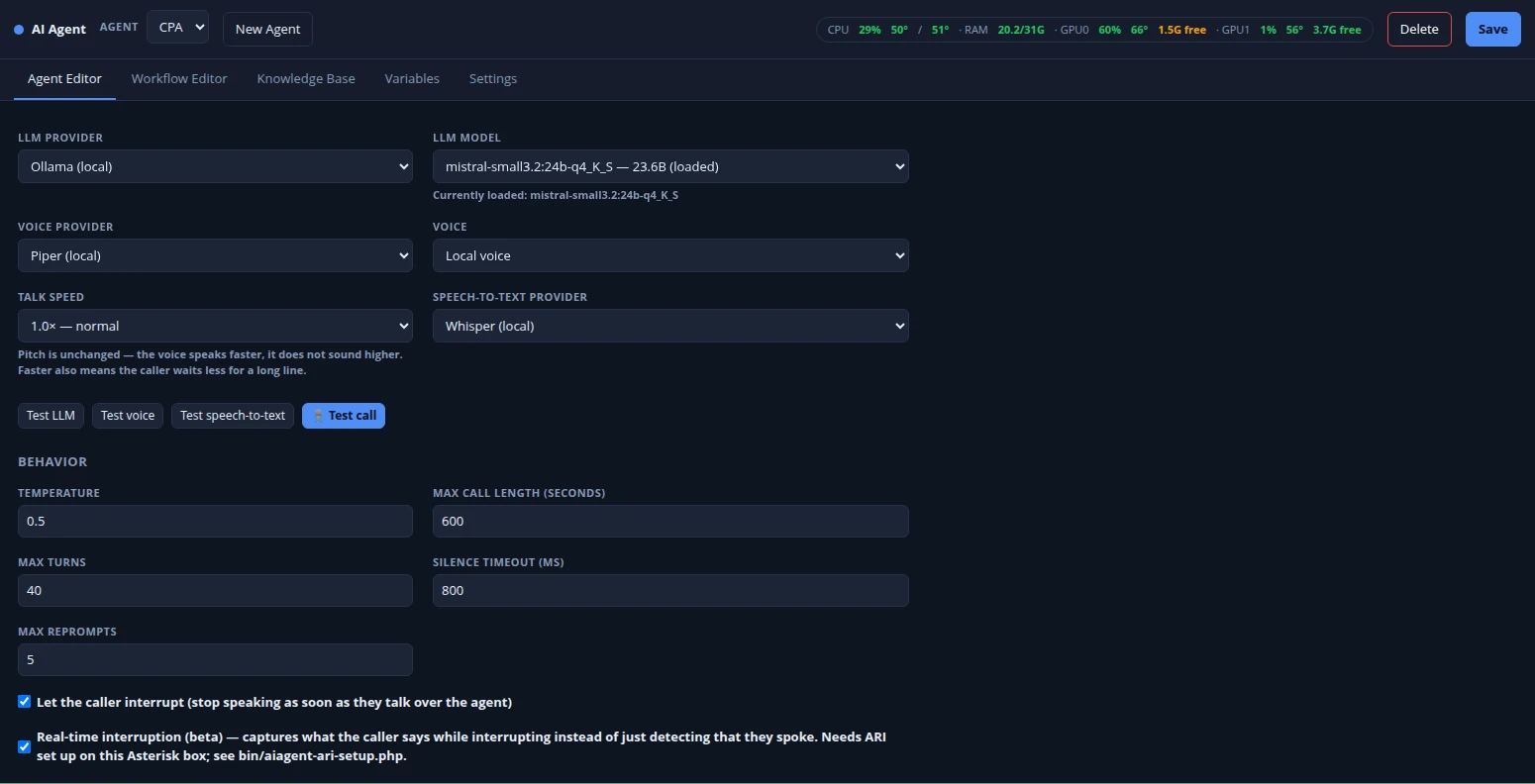
- Name, language, system prompt, first message, reprompt and no-answer lines, and short acknowledgement phrases played while a reply is being prepared. Pick the LLM provider and model, the voice provider, voice and talk speed, and the speech-to-text provider for each agent.
- Call behaviour
- Temperature, maximum call length, maximum turns, silence timeout and maximum reprompts. Callers can interrupt the agent (barge-in); an optional real-time mode over Asterisk ARI also captures what the caller said while interrupting.
- Workflow Editor
- Drag steps onto a canvas and connect them with conditions written in plain language or on variable values. Step types: agent turn, ask a question, take a message, transfer call (to a FreePBX destination given as context, extension, priority), call a webhook, end call.
- Variables
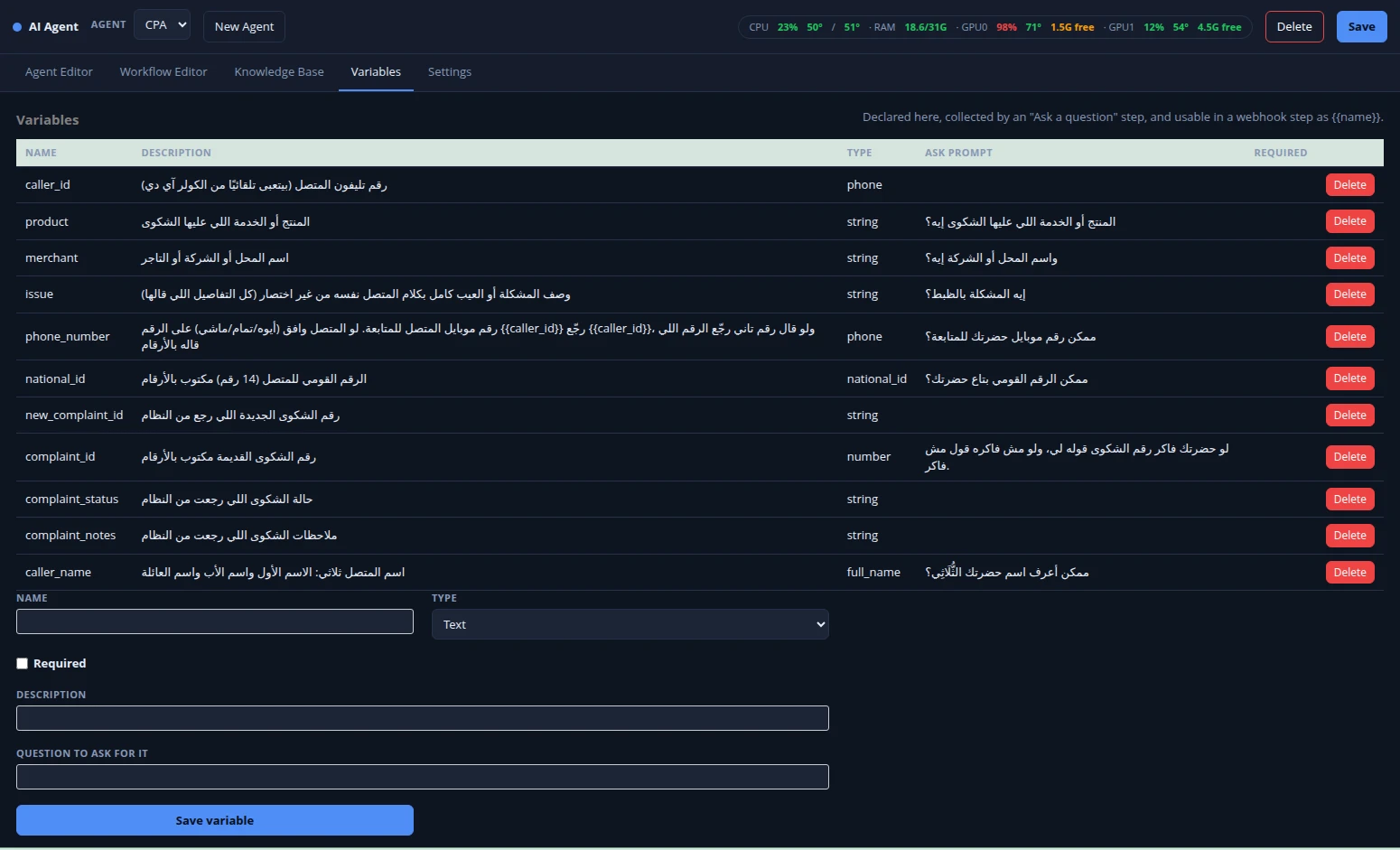
- Declare what the agent should collect – text, number, date, email, phone, national ID, full name or yes/no – with the question to ask for it. Use them in conditions and in webhook bodies as {{name}}.
- Webhooks
- GET, POST or PUT to your own systems with custom headers and a templated body, and map fields of the JSON reply back into variables the agent can read out – for example a ticket or order number.
- Knowledge Base
- Add documents by pasting text or uploading .txt, .md, .docx or .pdf files. Answers are grounded in the most relevant passages, found by embeddings (Ollama or OpenAI) or by keyword search when no embedding model is set. A test box shows what a question retrieves.
- Test from the browser: Test LLM, Test voice and Test speech-to-text buttons, and a Test call that talks to the agent through your computer's microphone and speakers with a live conversation log – no phone needed.
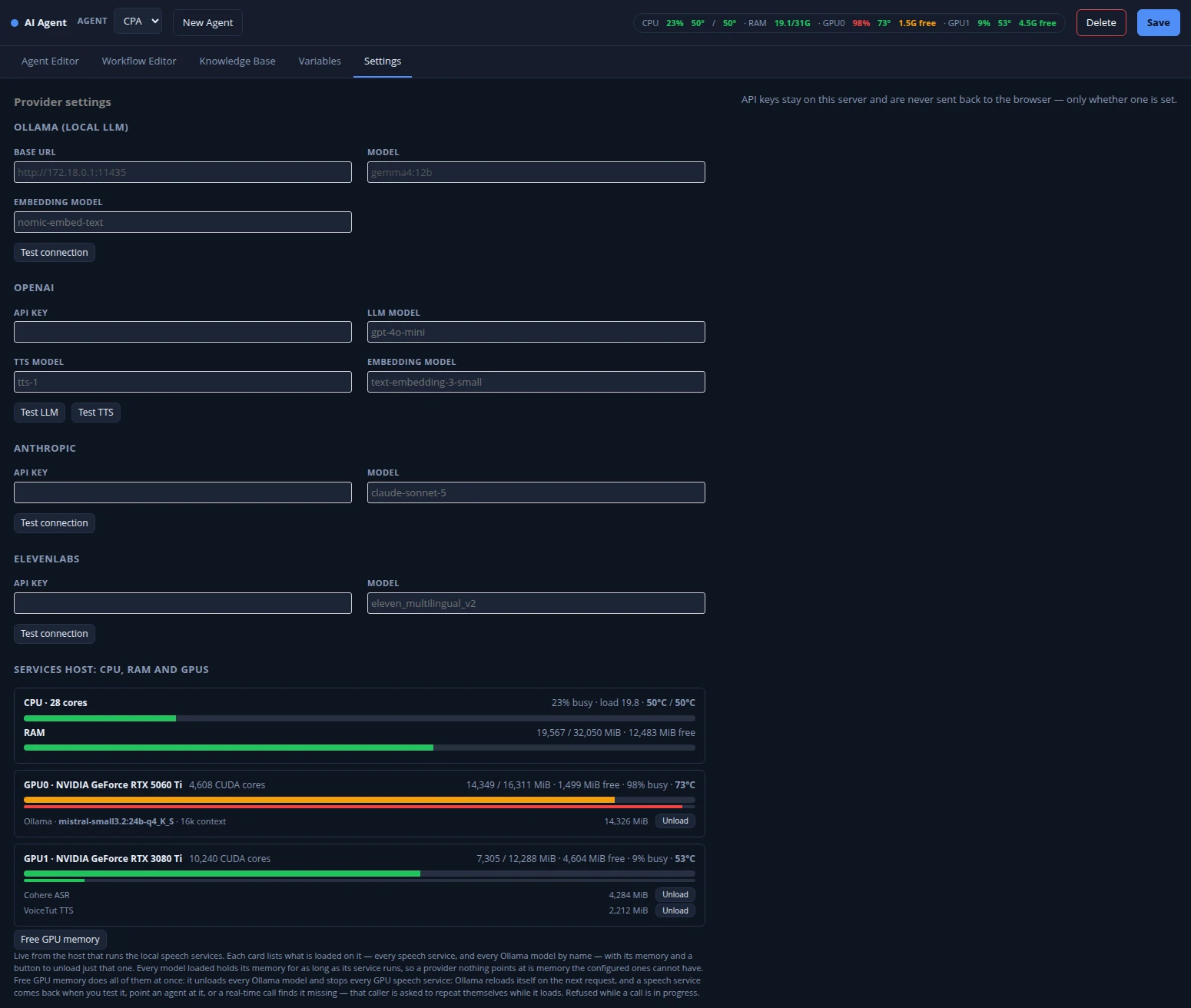
- Each provider in Settings has its own Test connection button. API keys stay on the FreePBX server and are never sent back to the browser.
- Agents can be exported to a JSON file and imported into another install from the command line, as a new agent or replacing an existing one.
Calls and operations
What you see once the agent is taking calls.
AI Agent Calls (included)
- Call list per agent with caller ID, duration, status, how the call ended, turns and actions.
- Per-call detail: the full transcript, the workflow path taken, actions performed (transfers, webhook calls, messages taken) and variables captured.
- Trend tiles: conversations, success rate, duration, transfer rate and turns per call, compared with the previous period.
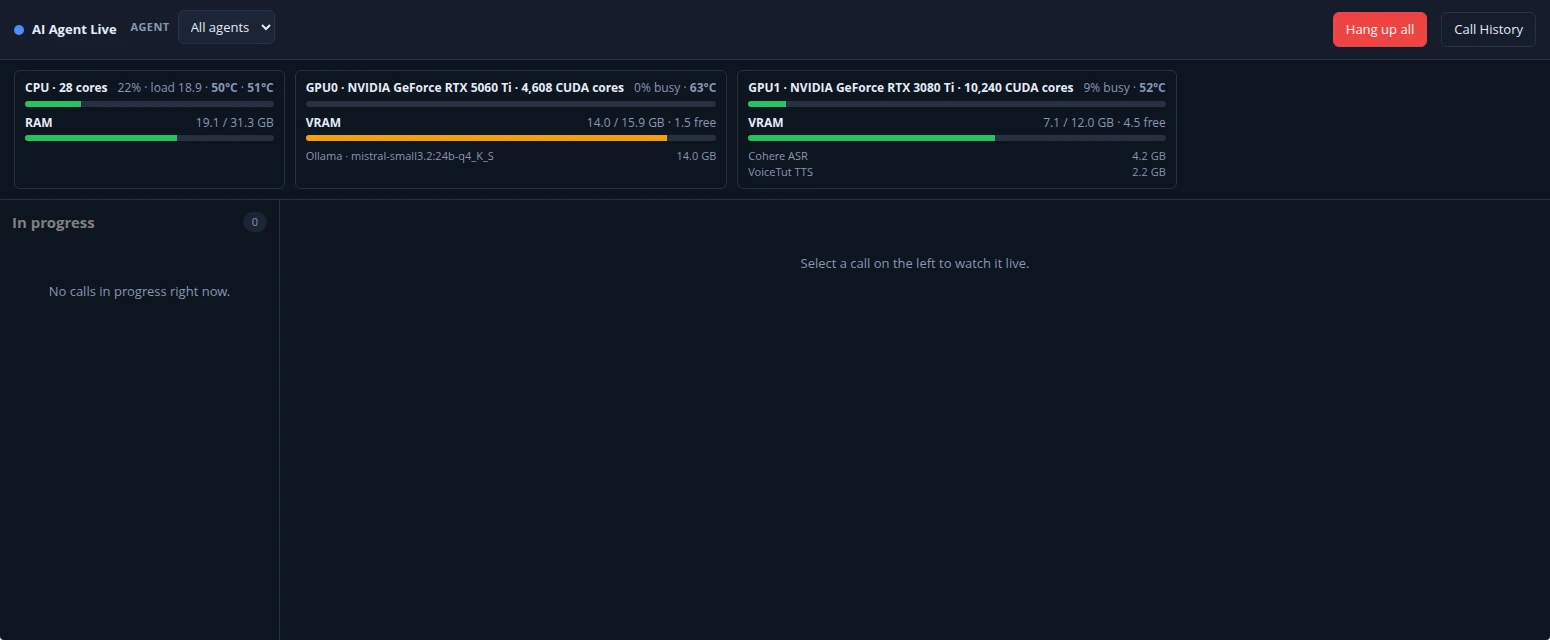
- AI Agent Live: follow a call in progress – transcript, captured variables and turn audio as they arrive – and hang up one call or all of them.
Services host monitoring
- CPU, RAM, GPU load, VRAM and temperatures of the machine running your speech services and models, live in the AI Agent page header.
- See which speech service or Ollama model is loaded on each GPU, unload one, or free all GPU memory with one click.
- Choose which GPU each local service loads on.
- These panels use the included control daemon (contrib/) on the services host; the module works without it, with these panels empty.
Requirements and what is included
Please read before buying: the AI itself runs on services you provide.
You need
- FreePBX 17 (Asterisk 21) with root access to install a module. It is installed from Module Admin as a third-party module, so FreePBX shows it as unsigned.
- A language model: an Ollama server reachable from FreePBX, or an OpenAI or Anthropic API key. A local model needs a suitable GPU for conversational response times.
- Speech-to-text: a Vosk server (standard vosk-server WebSocket protocol), a local Whisper service, or an OpenAI key for OpenAI Whisper.
- Text-to-speech: a local Piper service, or an OpenAI or ElevenLabs key. Local Piper and Whisper are reached through a small WebSocket service you run beside them.
- For real-time interruption: Asterisk ARI enabled (a setup script is included).
In the download
- The AI Agent module and the AI Agent Calls module, ready to upload in Module Admin.
- Command-line tools: real-time call daemon, ARI setup, agent export and import, health check and GPU memory reclaim.
- The contrib/ folder: the services-host control daemon, example systemd units and timers, and a sample exported agent.
- Not included: Ollama, language models, speech-recognition or voice models, GPU drivers, or cloud API accounts. Third-party models and services are under their own licences.
How licensing works
The price is a one-time fee per server: one licence covers one FreePBX server that AI Agent is installed on, with no recurring charge. After your payment is confirmed, the module file is available to download from your account, together with installation instructions. Any cloud AI provider you choose bills you directly for its usage. Screenshots on this page show the module running on our own test system.
Details
- Product type
- FreePBX module (AI Agent + AI Agent Calls), self-hosted
- Licence
- One-time fee per FreePBX server
- Delivery
- Module file to download from your account once payment is confirmed
- Requirements
- FreePBX 17 / Asterisk 21; an LLM (Ollama server, or an OpenAI or Anthropic key); speech-to-text and text-to-speech services or cloud keys – not included
- Includes
- Both module files, command-line tools and contrib/ helper scripts; no AI models
- LLM providers
- Ollama (local), OpenAI, Anthropic
- Speech providers
- Speech-to-text: Vosk, Whisper (local), OpenAI Whisper · Text-to-speech: Piper, OpenAI, ElevenLabs
- Workflow steps
- Agent turn, ask a question, take a message, transfer, webhook, end call
- Call records
- Transcript, workflow path, actions and variables per call; live call monitor
- SKU
- FPBX-AIAGENT