Software licence · VoIP & Telephony
Asterisk Reporting
CDR reports and live call-centre supervision for FreePBX
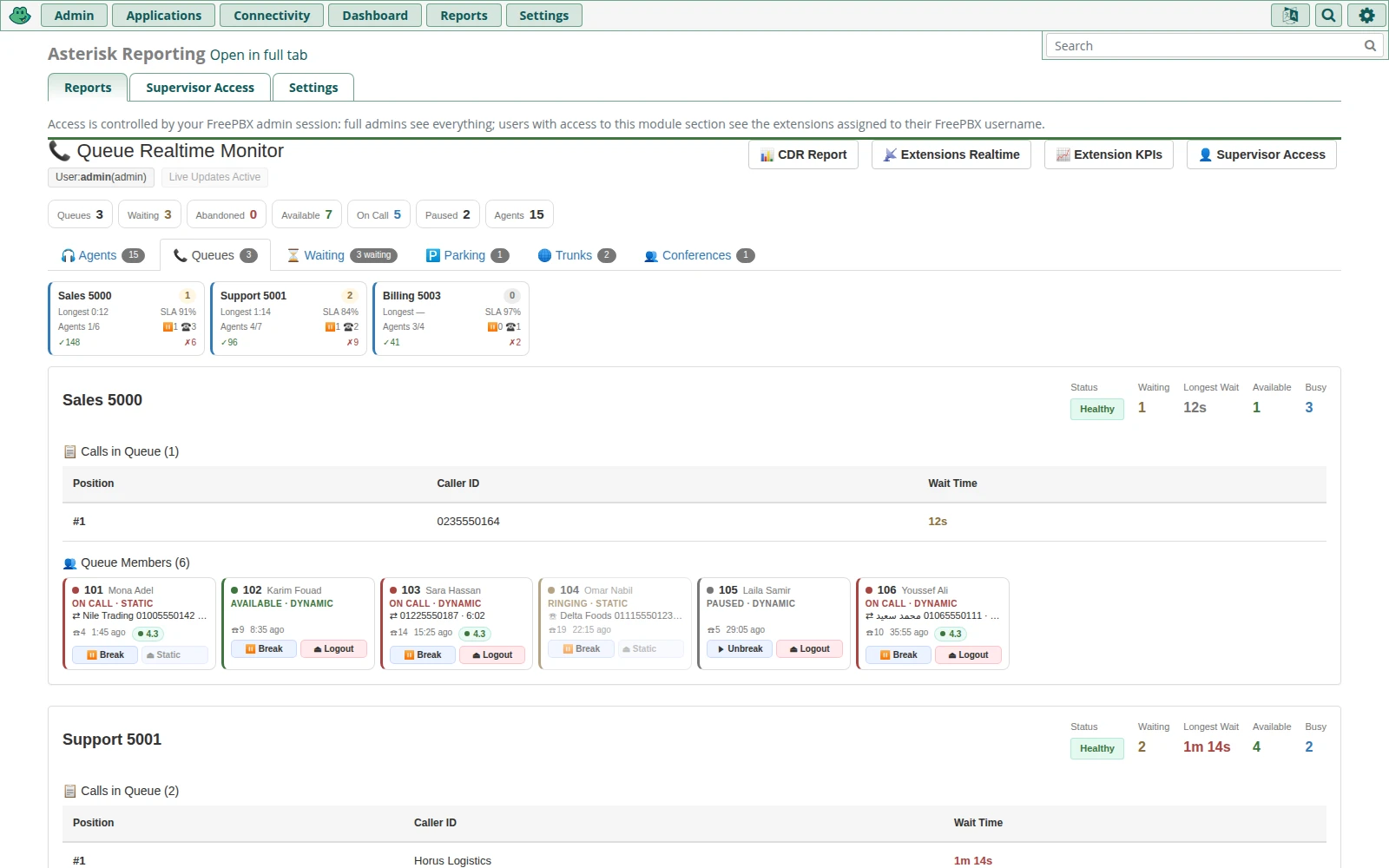
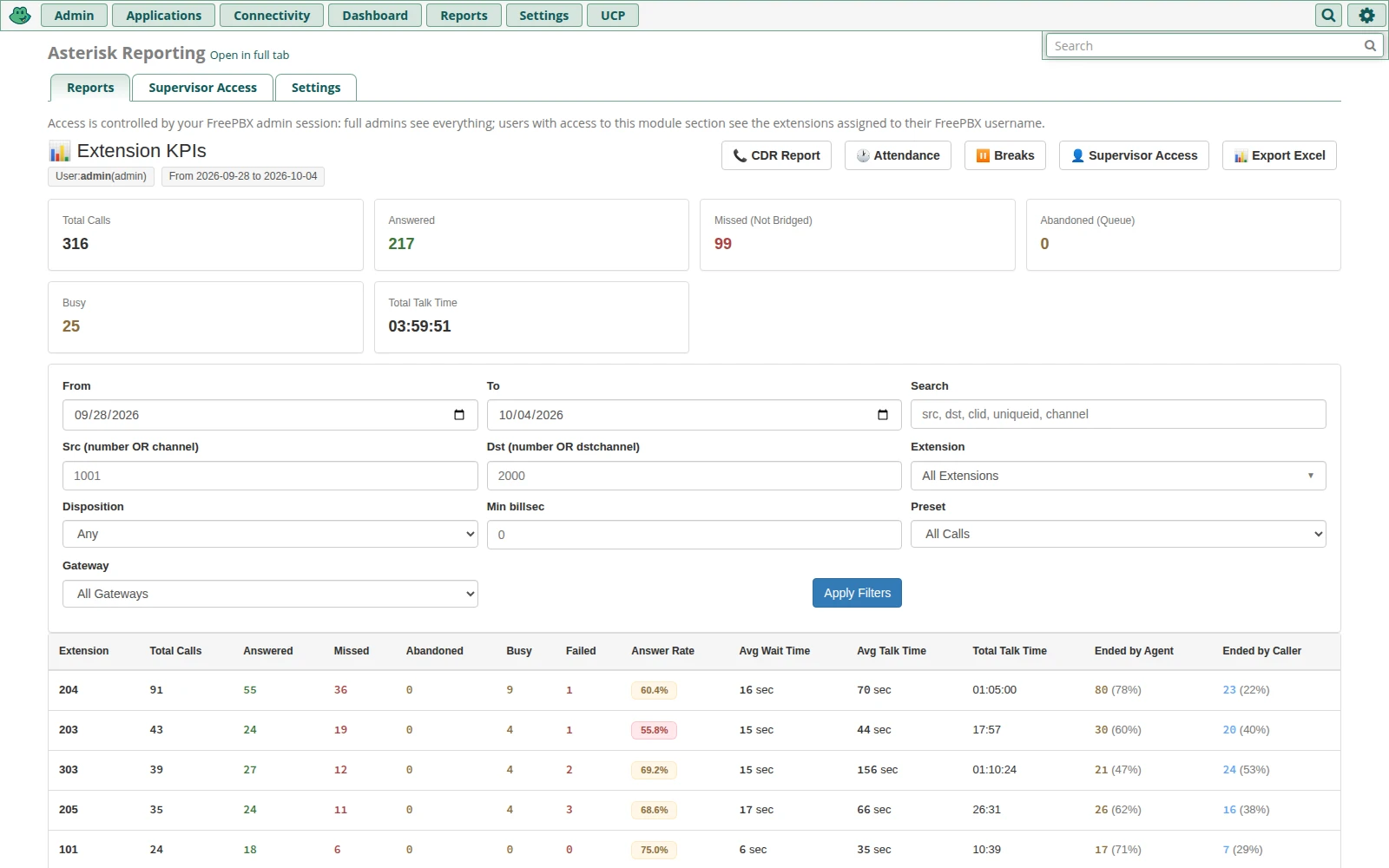
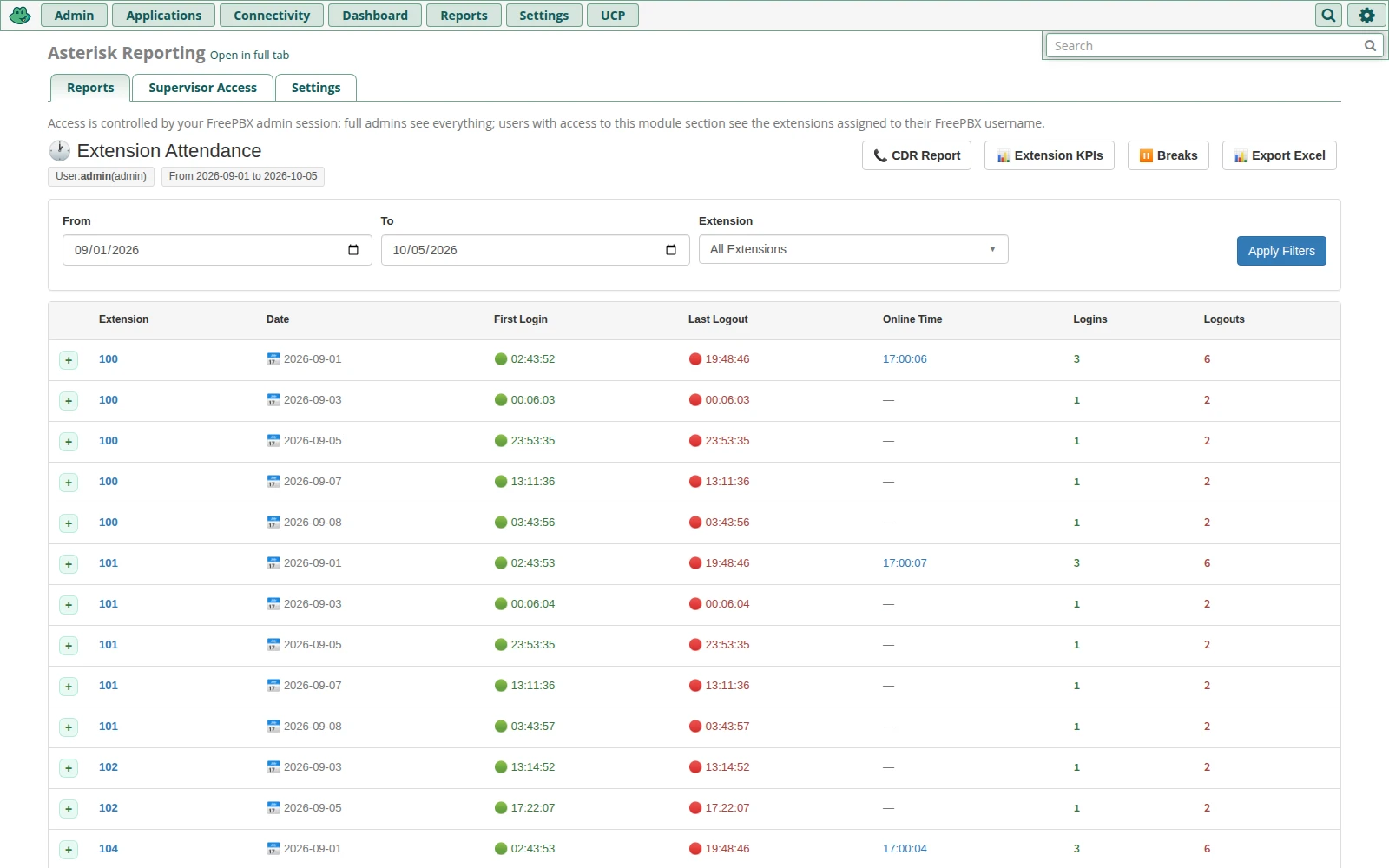
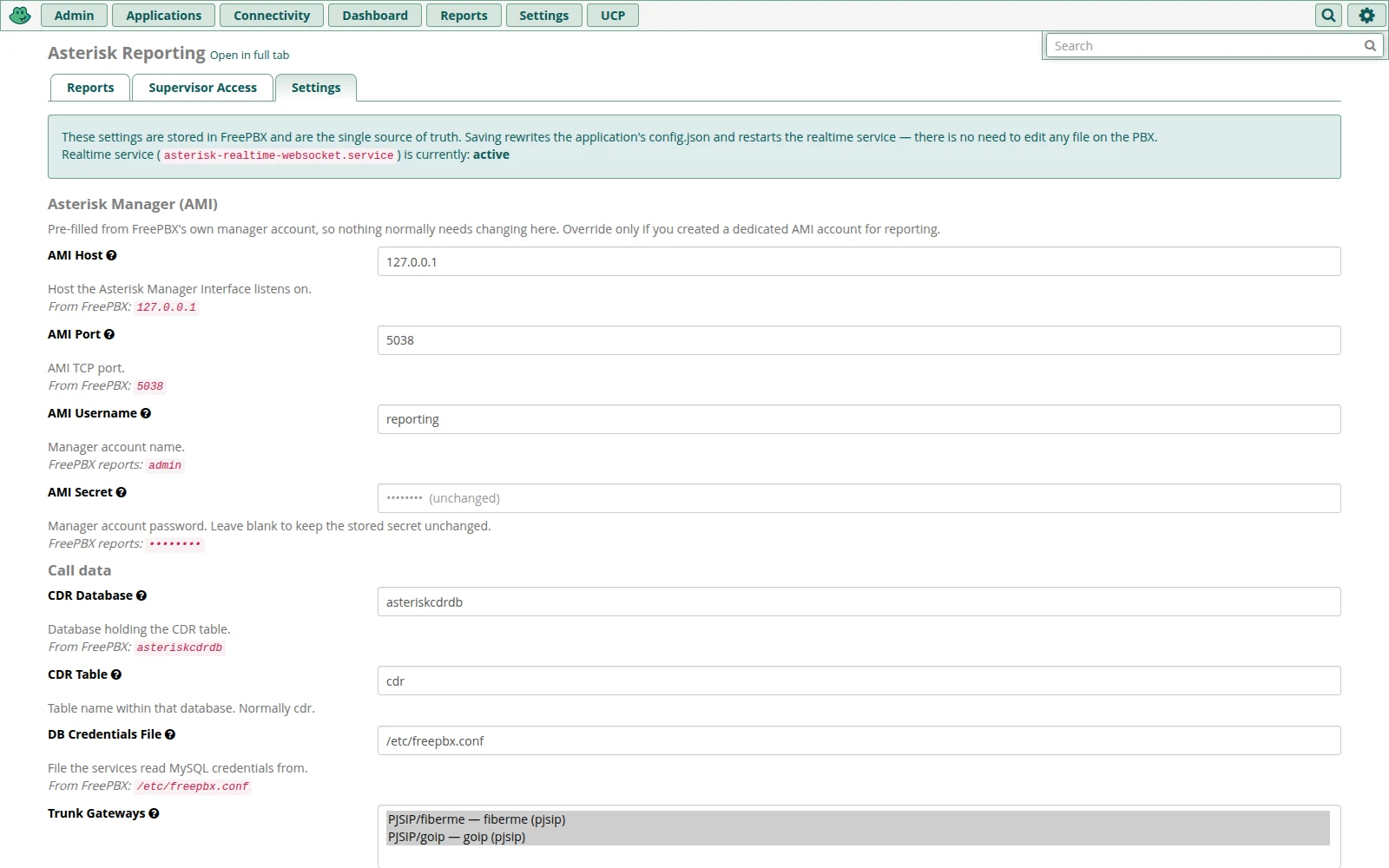
FreePBX module for call reports and live supervision: CDR presets, KPIs, attendance, call quality, realtime extension and queue panels with transfer, park and call barge.
Asterisk Reporting is a call-reporting and live supervision module for FreePBX. It adds a Reports → Asterisk Reporting page to the FreePBX admin panel with CDR reports, extension KPIs, attendance and break reports, and realtime wallboards for extensions and queues, so supervisors can see what happened today and what is happening right now.
It reads the call data FreePBX already records (the CDR database, queue log and call recordings) and talks to Asterisk over the Manager Interface (AMI). No changes to your dialplan are needed.
- Live operator panelExtension and queue status pushed live, with transfer, park, listen and barge one click away.
- Accurate call reportsCDR with presets, who ended each call, call quality and a graphic call flow.
- Per-supervisor accessEach FreePBX administrator sees, manages and reports on only their own extensions.
- Native FreePBX moduleInstalls from Module Admin, renders inside the FreePBX GUI and uses its login.
Reports
Filter by date and time, extension, trunk and outcome; export what you see.
- CDR report
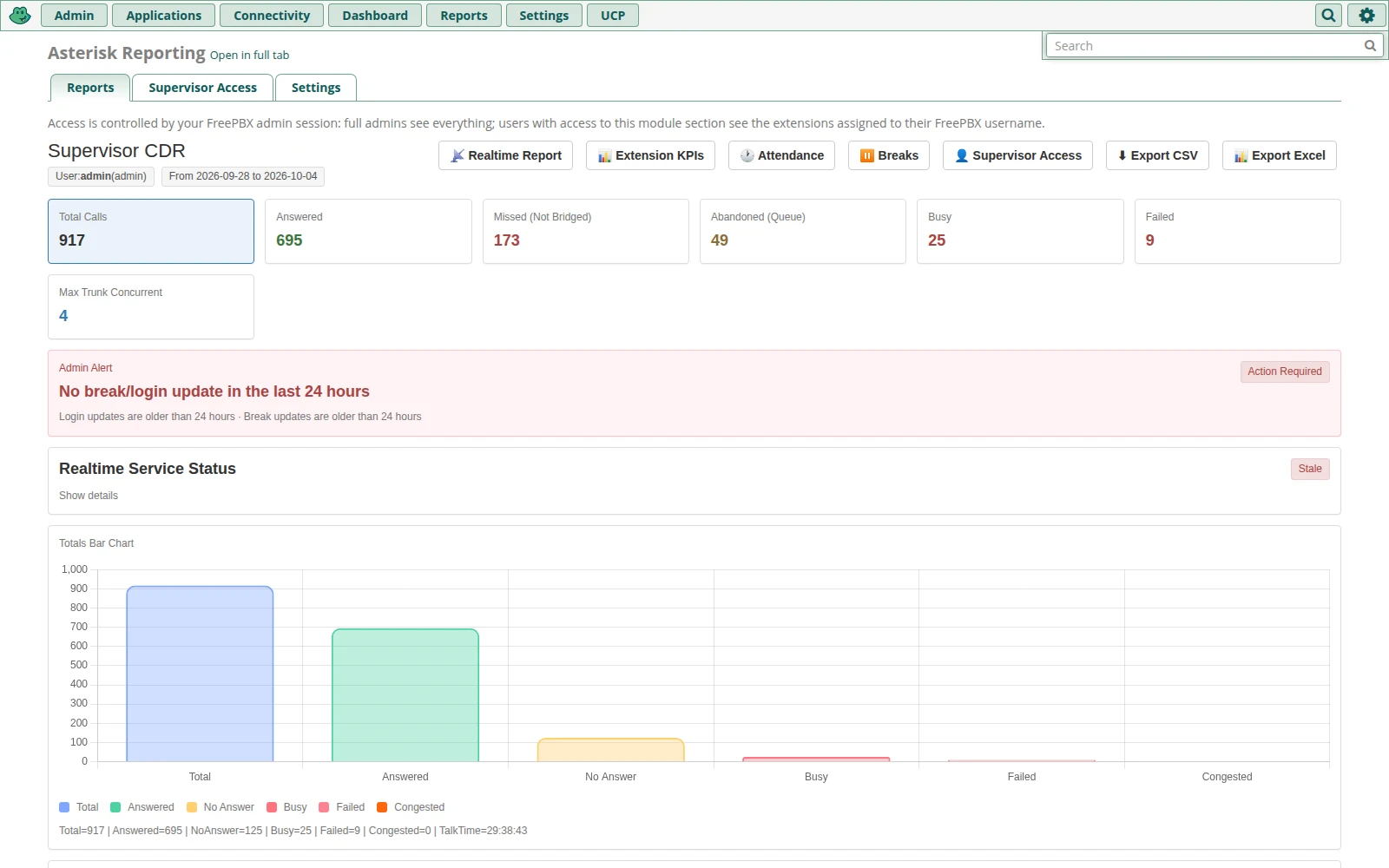
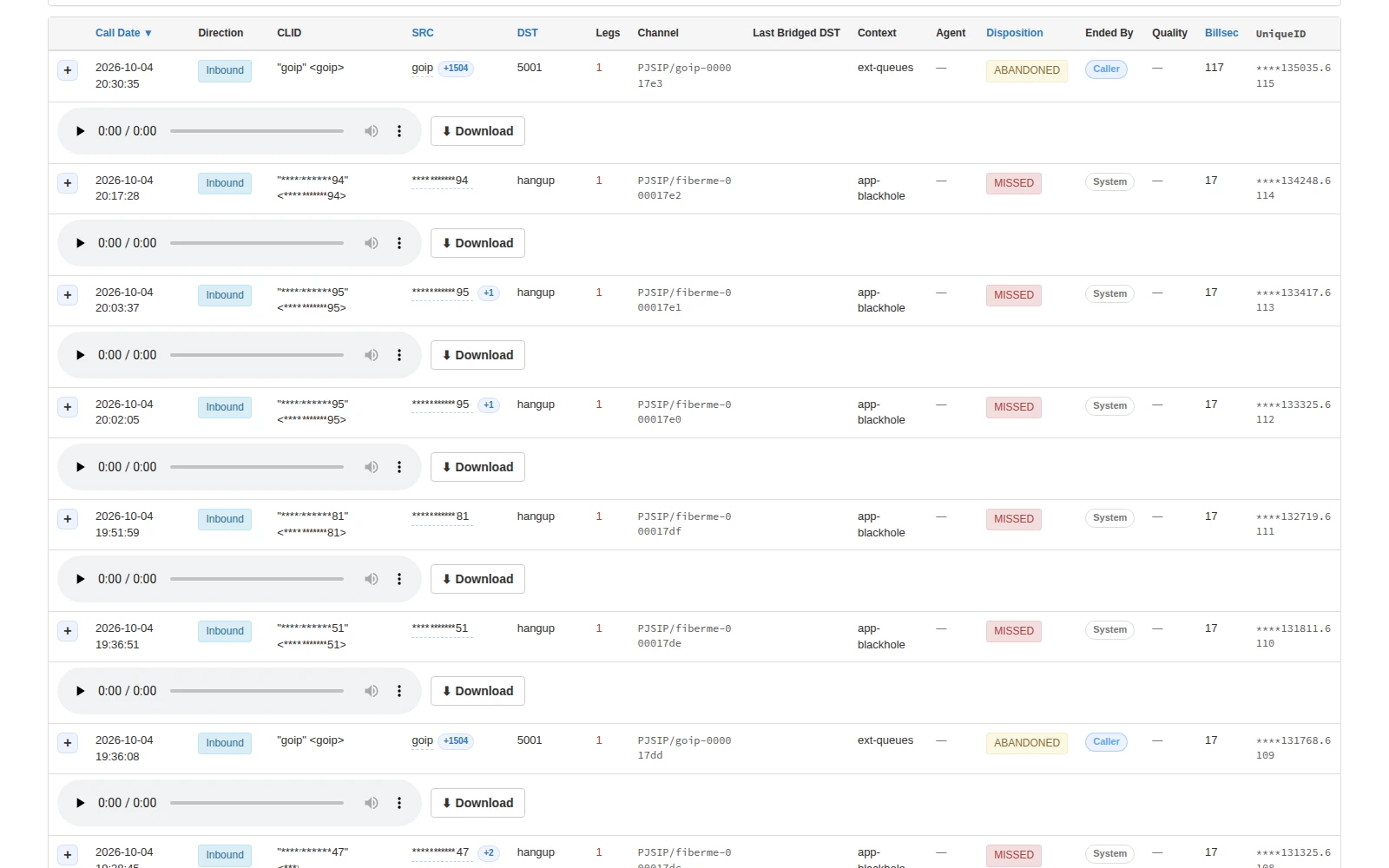
- Call totals by outcome with a chart, presets for inbound, outbound, internal, answered, missed and abandoned (queue) calls, the connected agent, who hung up (caller, agent or system) with the hangup cause, and a group-by-caller view with each number's call history.
- Call flow
- Expand any call to see a timeline with one lane per channel, marking answer, hangup and transfer points.
- Call quality
- An estimated MOS per call, with packet loss, jitter and round-trip time, taken from Asterisk's RTCP statistics.
- Recordings
- Play or download a call's recording from its row. Supervisors can only open recordings of their own extensions.
- Extension KPIs
- Per-extension totals for answered, missed, abandoned, busy and failed calls, answer rate, total and average talk time, and average wait time, plus inbound, outbound and internal calls, first and last call, who ended each call and call quality. Click any number to see the calls behind it, with call flow and recording playback.
- Attendance & breaks
- Queue login and logout times, online time, and the number and total length of breaks per extension per day, built from the Asterisk queue log.
- Exports
- CSV and Excel export of the CDR report, and Excel export of the KPI, attendance and break reports.
Realtime monitoring and control
Two live operator panels, opening on a dashboard and organised in tabs, updated continuously.
Extension monitor
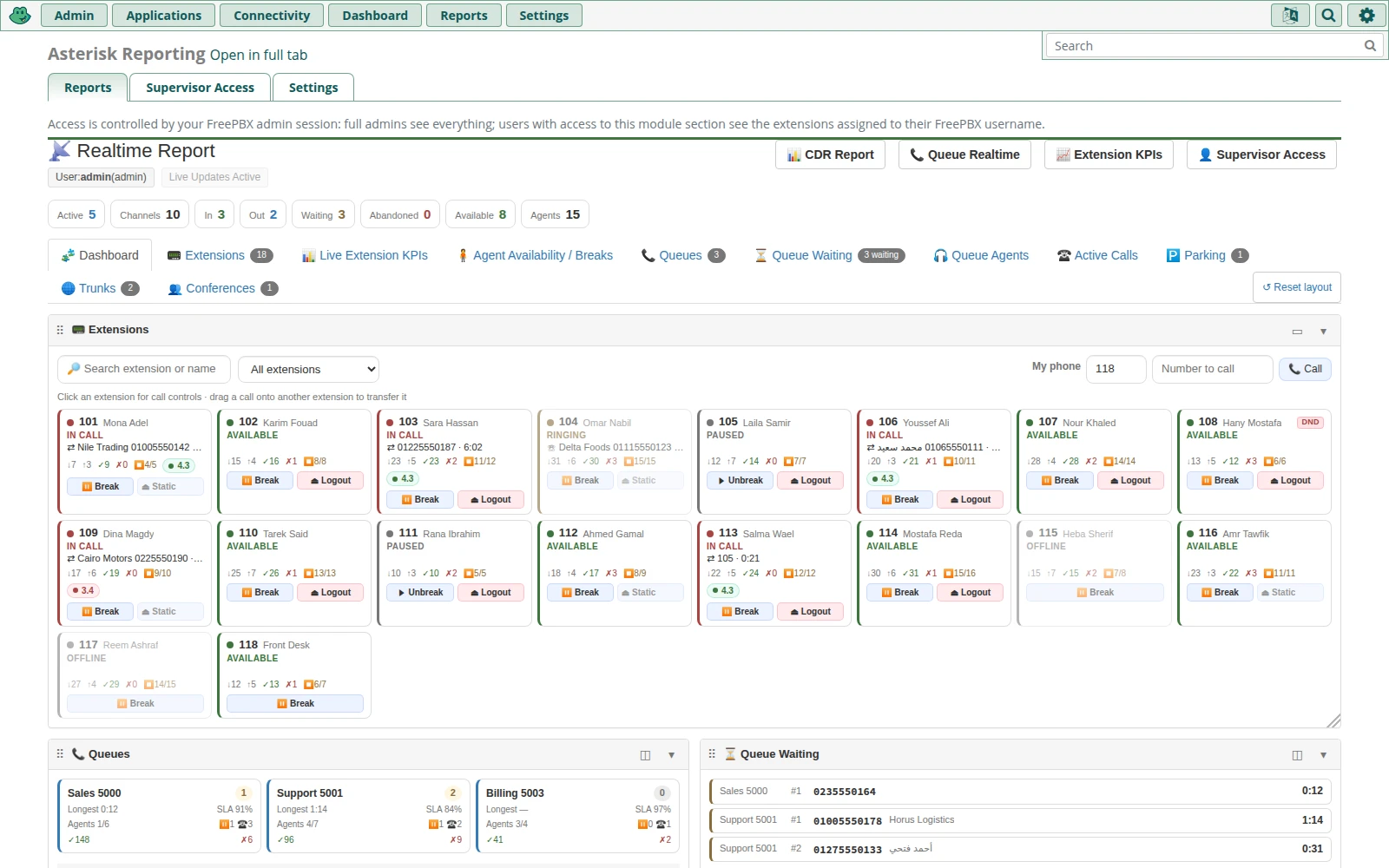
- A compact tile for every registered extension showing whether it is online, offline, in a call, ringing, on hold, paused or on Do Not Disturb, and who it is talking to.
- A dashboard showing every section at once as cards you can drag to rearrange, resize and collapse. Each browser remembers its own layout.
- Tabs for live extension KPIs, agent availability and breaks, queues, callers waiting, queue agents, active calls and parked calls.
- Search by extension or name, and filter the tiles to one queue's agents.
Queue monitor
- A panel for each queue showing a Healthy, Busy or Critical status, available and busy agents, and the longest wait.
- Callers waiting, listed by position and wait time. A caller who hangs up while queued blinks before being removed.
- Agent tiles, and each queue's members as cards, showing status, calls taken, last call and the caller on the line.
Call control and supervisor tools
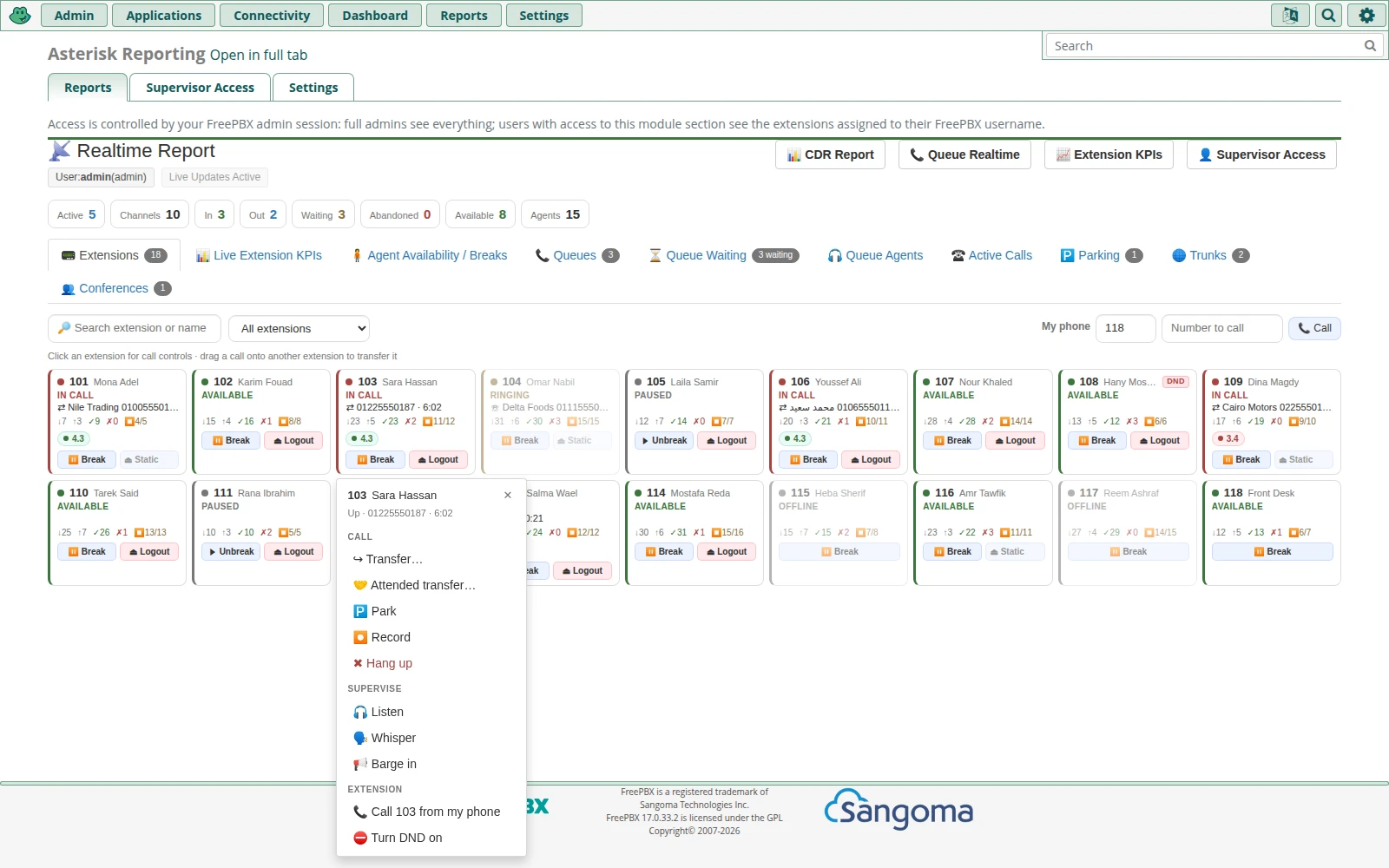
- Click any extension or agent to hang up, transfer (blind or attended), park or record its call, pick up a ringing call on your own phone, or call it with one click. Drag a call onto another extension to transfer it, or onto the Parking tab to park it.
- Listen, whisper or barge in on an agent's call from your own phone, and turn Do Not Disturb on or off for an extension.
- Pick up parked calls from the Parking tab. Full administrators also get a Trunks tab with channels in use and reachability, and a Conferences tab to mute, remove or lock conference members.
- Break / Unbreak an agent in all of their queues, and log dynamic queue members in or out, from the realtime pages.
- On the Supervisor Access tab, a full FreePBX administrator decides which extensions each restricted administrator may watch, manage and report on. The live feed sends each supervisor only their own extensions.
Installation
What the module does for you, and what you may need to do yourself.
The module install
- Upload the module file in Admin → Module Admin → Upload Modules, or run
fwconsole ma installlocal. - It publishes the app at
/supervisor2/and adds the Asterisk Reporting page under Reports, with Reports, Supervisor Access and Settings tabs. - On the Settings tab, the AMI account, CDR database, recording and log paths are pre-filled from FreePBX, and trunks are picked from your trunk list.
The realtime service
- The live screens need a small Python WebSocket service (
asterisk-realtime-websocket), which ships inside the module. - The install runs the bundled
install-services.sh. It finds Python 3.6 or newer, installs thewebsockets,pymysqlandaiomysqlpackages with pip, and enables and starts a systemd service. - If the install can't get root, the service runs as the web user instead, with a cron watchdog that restarts it. To move it to systemd later, run
install-services.shas root. The module page shows a warning whenever the service is not running. - The service uses port 8765, proxied through the FreePBX web server. Uninstalling the module stops and removes the service.
- Requirements: FreePBX 14, 15, 16 or 17 with Asterisk, MySQL/MariaDB CDR, Python 3.6 or newer, and internet access from the PBX for the first pip install.
- Break and queue login/logout need an AMI account with the
agentwrite permission; call control also needscall,originateandcommand. FreePBX's own manager account, used by default, already has them.
How licensing works
The price is a one-time fee per server: one licence covers one FreePBX server, with no recurring charge. Once your payment is confirmed, the module file is available to download from your account, together with installation instructions.
Details
- Product type
- FreePBX module (supervisor2) with a bundled realtime Python service
- Access control
- FreePBX login; per-administrator extension scoping
- Licence
- One-time fee per FreePBX server
- Delivery
- Module file to download from your account once payment is confirmed
- Requirements
- FreePBX 14–17 with Asterisk, MySQL/MariaDB CDR, Python 3.6+, internet access for the first pip install
- Includes
- CDR report, extension KPIs, attendance and break reports, extension and queue realtime panels with call control, supervisor access control, realtime WebSocket service with installer
- Call control
- Hang up, blind and attended transfer (drag and drop), park and pick up, record, listen / whisper / barge, click-to-call, DND; trunk and conference views for admins
- Realtime service
- Python WebSocket service on port 8765, proxied through the FreePBX web server
- Exports
- CSV and Excel
- SKU
- FPBX-REPORTING